
Find every placeyour teamretypes data.
Two weeks of observation. Every re-entry mapped. Fixes ranked by payback. One fixed fee, agreed up front.
20-minute call with the founder. No prep needed.
- 01 / 03
Teams, not people.
Findings are reported for groups of 5 or more, under IDs instead of names.
- 02 / 03
Staff stay in control.
They choose which tasks to walk us through and can stop a session at any time.
- 03 / 03
Light on your team.
A few short screen-shared walkthroughs, a 1-week work log, and exports your systems already produce.
Illustrative savings opportunity
Know what every opportunity is worth.
Illustrative example, not a customer result. Savings opportunity for an example 15-person order-entry team: conservative $15,000, expected $21,000, upside $28,000 per year; 60, 85 or 120 hours recovered per month; the expected value is $18,000 of time and $3,000 of invoice-verified cash. Revenue is not included. Method: half of freed time counted; cash only from invoices.
ILLUSTRATIVE EXAMPLE · NOT A CUSTOMER RESULT
Savings opportunity · Example team · 15 people · order entry
Human-verified- Conservative
- $15,000/ yr
- 60 hrs recovered / month
- Expected
- $21,000/ yr
- 85 hrs recovered / month
- Upside
- $28,000/ yr
- 120 hrs recovered / month
Expected value split
- Time (capacity) $18,000
- Cash (invoice-verified) $3,000
Revenue upside: not included in totals
¹ Method: half of freed time counted as value; cash only from invoices; revenue kept out of totals. Illustrative numbers.
Illustrative example, not a customer result. Numbers are rounded examples for a hypothetical 15-person order-entry team, assuming a $35/hr loaded cost. Your results depend on what we measure.
Sample report / fictional sample data
See the report.
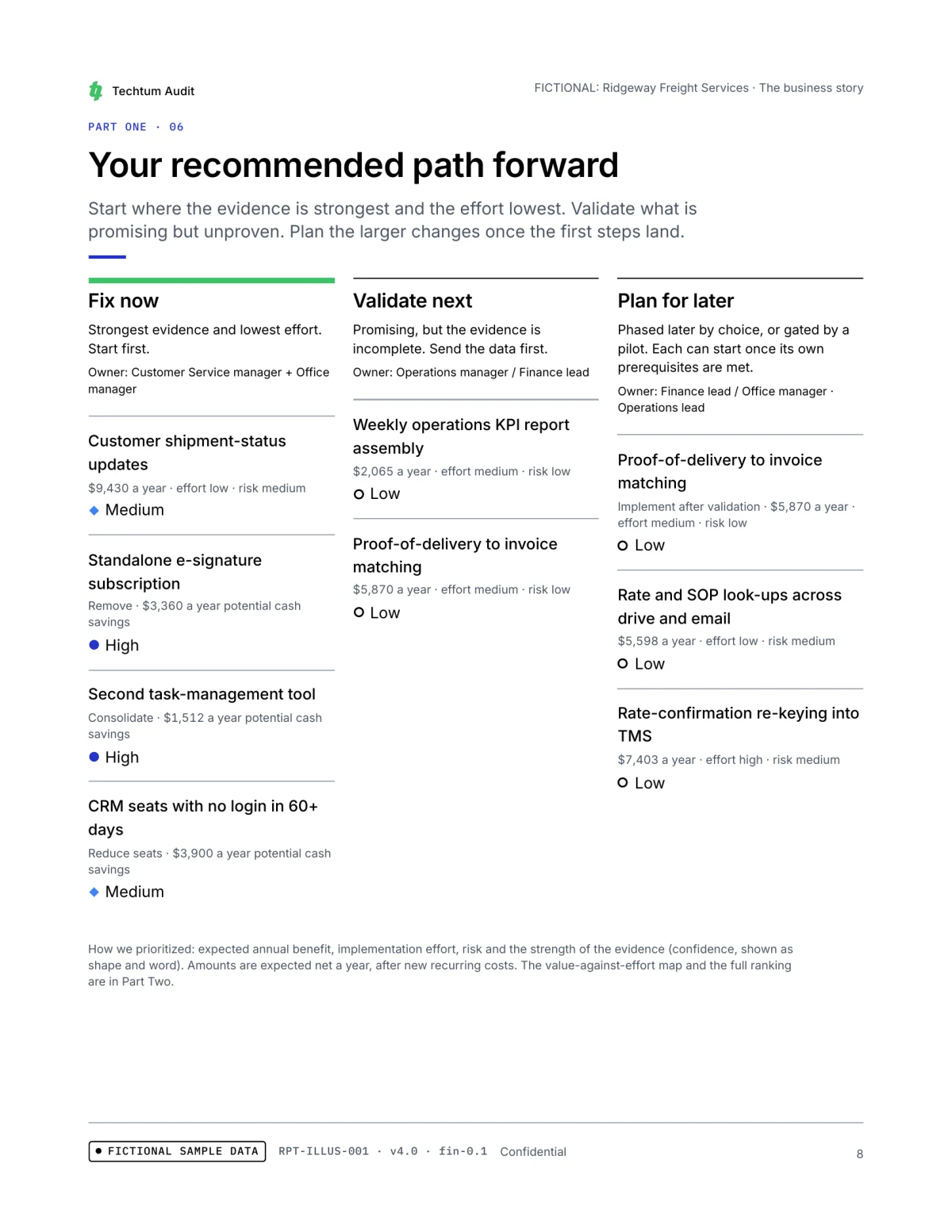
Built on a made-up freight company, in the format your team receives.

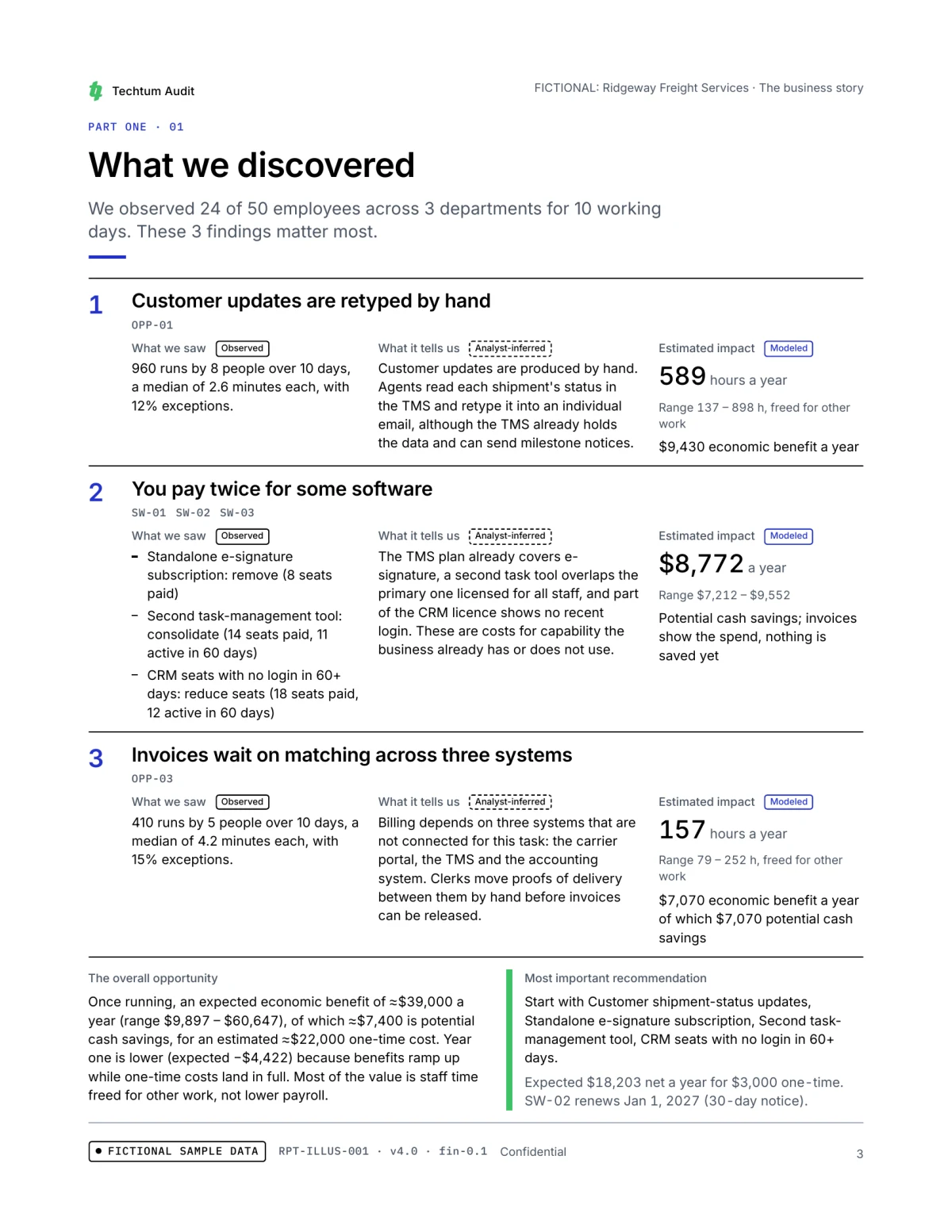
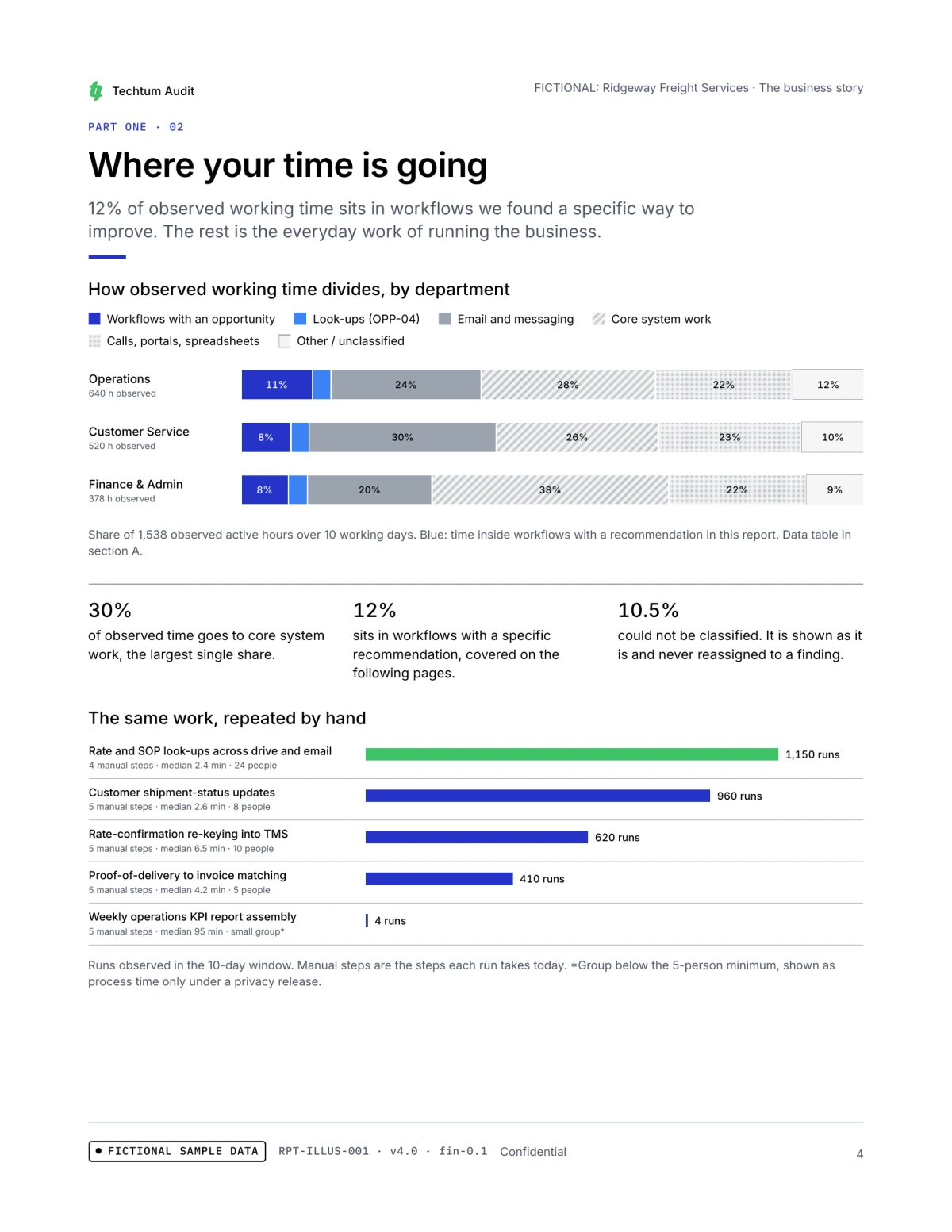
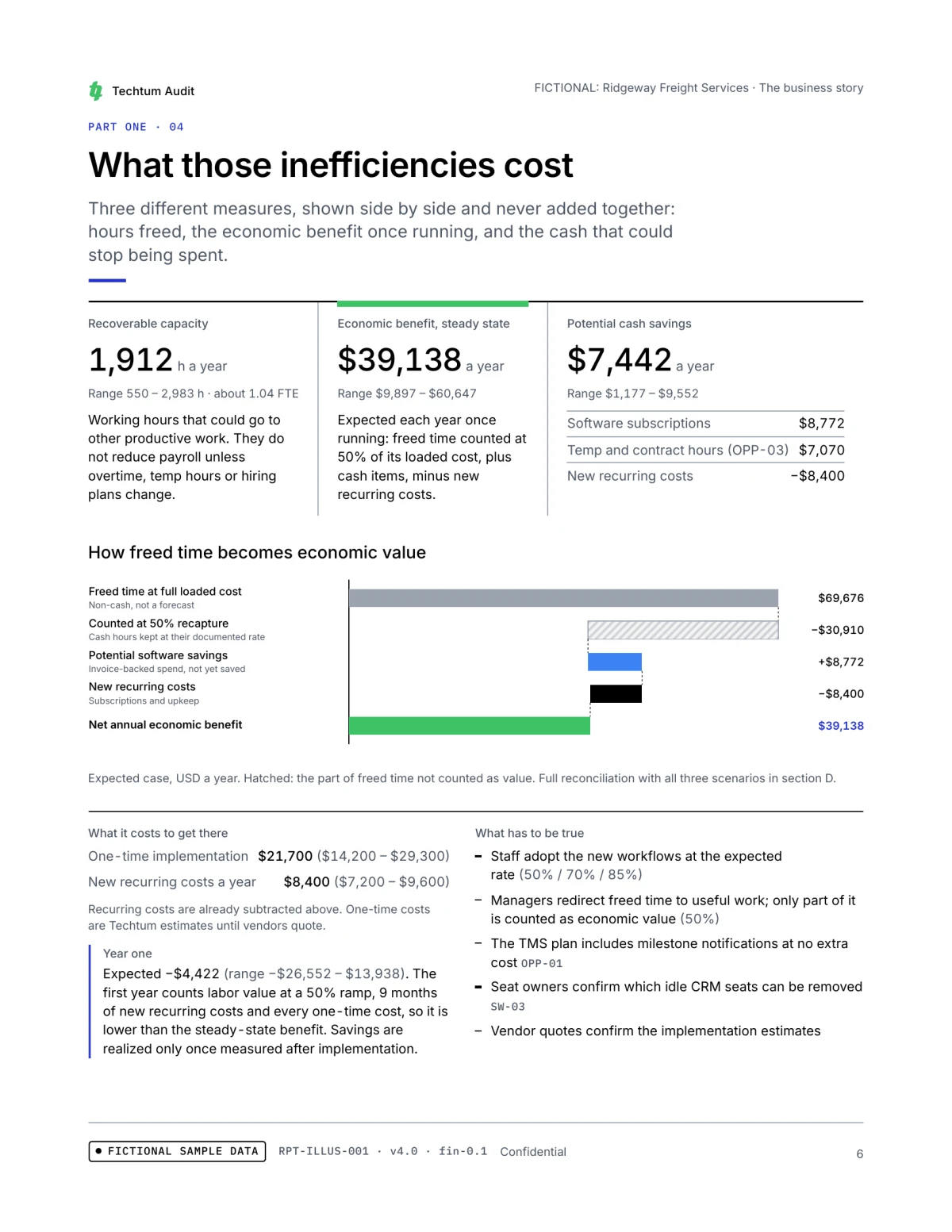
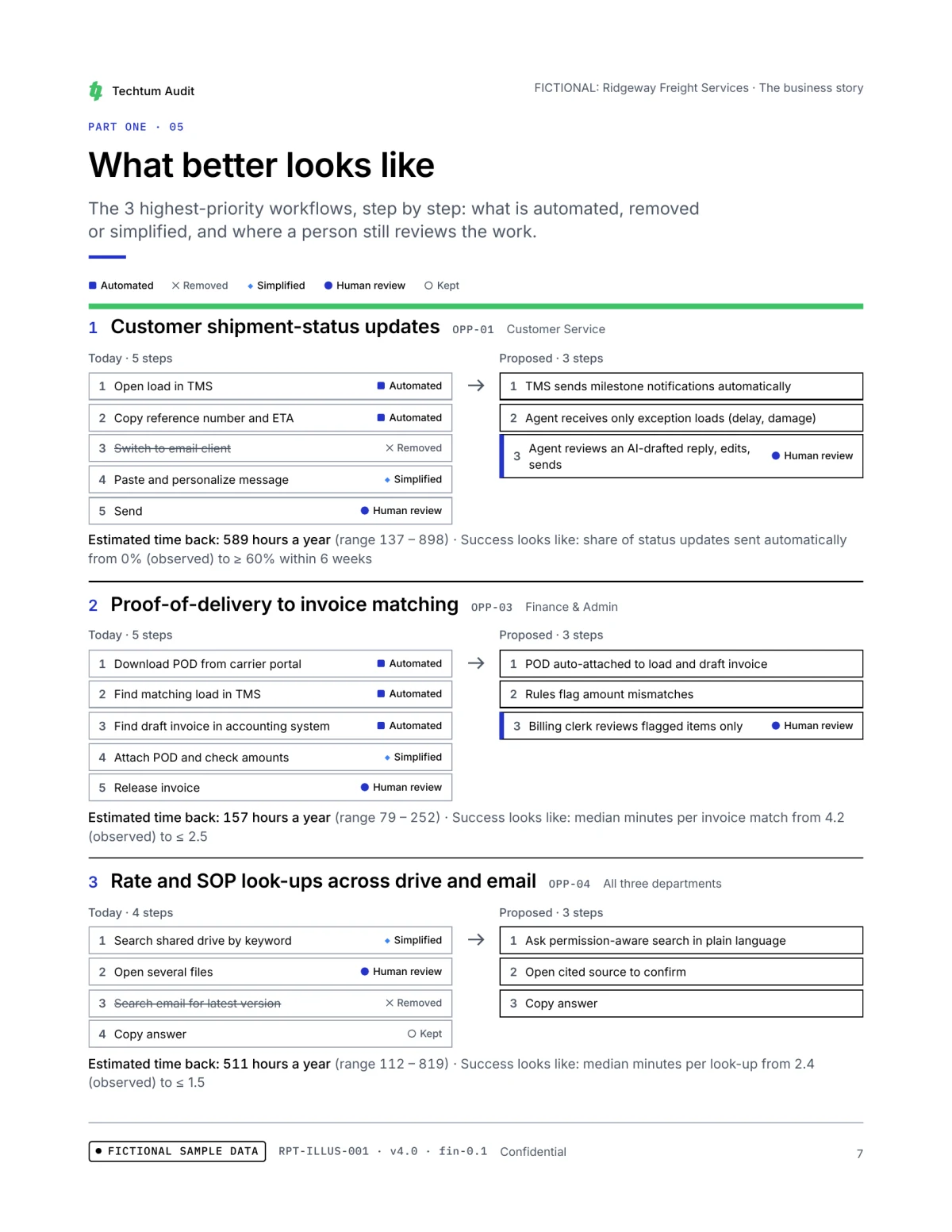
01 / The problem
The work nobody sees.
Order received
Steps between Order received and Entered in ERP:
- Open the PDF order
- Select the PO number
- Copy
- Switch to the ERP
- Paste the PO number(duplicate manual step)
- Type 6 line items(duplicate manual step)
- Check the total
Entered in ERP
Steps between Entered in ERP and Load booked in TMS:
- Open the order
- Copy the ship-to address
- Switch to the TMS
- Paste the address(duplicate manual step)
- Type weight and pallets(duplicate manual step)
- Pick a carrier
Load booked in TMS
Steps between Load booked in TMS and Invoiced:
- Find the POD in email
- Open the attachment
- Switch to billing
- Type the load number(duplicate manual step)
- Type the rate(duplicate manual step)
- Send the invoice
Invoiced
- 4steps on the map
- 23that actually happen
- 6duplicate manual steps
Duplicate manual step · Steps vary by team
02 / The approach
From scoping call to roadmap in five weeks.
Two weeks of observation during normal work. Three meetings to your readout, plus an optional handoff session.
- Week 0
Scope call
- Weeks 1–2
Observe
- Week 3
Verify
- Week 4
Readout
- Week 5
Handoff
- Week 0
Scope call
- Weeks 1–2
Observe
- Week 3
Verify
- Week 4
Readout
- Week 5
Handoff
03 / Your team
We study work, not workers.
Your team will know exactly what we see, and what we don’t.
Illustrative: each name is combined with a random salt and hashed, and the analysis uses only the resulting code. Five codes are then reported together as one group.
What your report shows
Group G-05
5 people, reported together
- P-03
- P-07
- P-11
- P-14
- P-19
- Names in findings
- 0
- Individual scores or rankings
- 0
- Smallest group we report on
- 5
No individual scores, rankings or productivity grades. Small groups and unique roles are merged so no one stands out.
Illustrative
What we see
- We capture:Screen-shared walkthroughs that staff agree to (task screens only)
- We capture:A 1-week work log completed by staff
- We capture:Volume exports from your systems (for example, order counts)
What we never see
- We never capture:Audio recordings of calls or conversations
- We never capture:Keystroke logging of any kind
- We never capture:Anything from personal devices or accounts
- We never capture:Webcam or biometrics
Stop any time
Staff pick the tasks they show us and can end a walkthrough whenever they like.
A notice kit, first
A plain-language employee notice and FAQ to share before anything starts.
Light on your team.
2 weeks, a few 20–30 minute screen-shared walkthroughs, a short work log, and exports your systems already produce. No software to install for founding audits.
04 / Independence
We measure. We don’t sell the build.
Our ranking isn’t shaped by what we can sell you. You get build-ready specs that your own team, or any implementer, can quote. You own the report.
Illustrative roadmap · Example only
Illustrative roadmap, example only. Phase 1, 0 to 30 days: two quick wins owned by your team. Phase 2, 30 to 90 days: document capture and an accounting integration, owned by an implementation partner you choose. Phase 3, 90+ days: portal automation, owned by a partner. Techtum does not implement.
Phase 1 · Quick wins
0-30 days
- RM-01Quick win
Standard order-email form
Owner: Your team
Effort S · HO-01
- RM-02Quick win
Remove a duplicate approval step
Owner: Your team
Effort S · HO-03
Phase 2 · Integrations
30-90 days
- RM-03
Document capture for PDF orders
Owner: Partner of your choice
Effort M · HO-01
Depends on RM-01
- RM-04
TMS/ERP ↔ accounting integration
Owner: Partner of your choice
Effort M · HO-03
Depends on RM-02
Phase 3 · Larger automation
90+ days
- RM-05
Automate carrier-portal updates
Owner: Partner of your choice
Effort L · HO-04
Depends on RM-03
- Your team
- Implementation partner (your choice)
- Depends on
Illustrative example. Your roadmap is built from what we measure. Techtum doesn’t implement; each item is owned by your team or an implementation partner you choose.
We’ll show you how the roadmap is handed to your team or a partner.
05 / The terms
One fixed fee.
Every audit is a fixed fee, scoped to your team size and agreed in writing before any work starts. No hourly billing, no software subscription, no build upsell.
Scope it on the call
- 1 team
- 2 teams
- Optional Software Spend Check
Founding-customer terms are available for our first 5 customers.
We’ll scope it with you on a 20-minute call.
Schedule a demoOur guarantees
- 01
Data guarantee
If we don’t collect enough usable observation data, we extend for free or refund 100%.
- 02
Evidence guarantee
If we find fewer than 5 verified opportunities, each backed by evidence, we refund 50%.
- 03
Measured, not guessed
Every figure in your report comes from your own operations: measured, verified by an analyst, and presented as a range you can act on.
Full guarantee terms are set out in your written agreement before any work starts.
06 / Questions
Everything you need to know.
What business owners and IT leaders ask before they book.
Schedule a demo- We study work, not workers. Findings use IDs instead of names, we report only on groups of 5 or more, and we never rank individuals. You get a ready-made notice so your team hears it from you first. Staff choose what to walk us through and can stop a session at any time.
- Raw walkthroughs involve real people. Findings use IDs instead of names and are reported for groups of 5 or more. We merge small groups and unique roles so no one stands out.
- Yes. In founding audits, staff decide which tasks to show us and can end a walkthrough at any time. If we can’t collect enough data, our data guarantee applies.
- Nothing, for founding audits. We use screen-shared walkthroughs, a short work log, and exports your systems already produce.
- No keystroke content and no audio, ever. Walkthroughs are screen-shared live, with consent, and only show the task screens staff choose.
Find out where AI could save your company time and money.
A 20-minute call with the founder. We’ll select the team to audit, walk you through how the financial assessment and roadmap are built, and give you a fixed price.
What happens on the call ↗
- 5 minYour team, your systems and where time and money are being lost.
- 10 minHow the audit works, and what the savings section and roadmap look like.
- 5 minScope, fixed price and next steps.
Step 1 of 2
Tell us about your team.
Takes under a minute. Then we’ll set up the call.